
 Watch the original videoInstagram (opens in a new tab)
What you'll make
A checked final video that follows the source workflow and is ready for export.
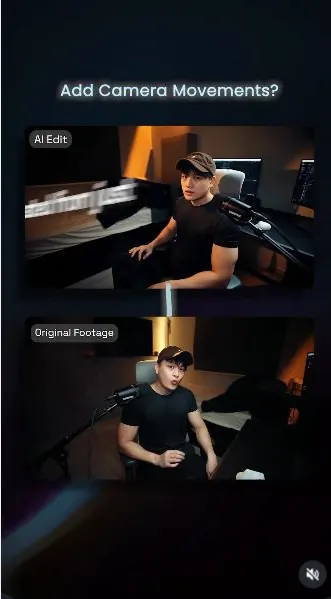
Add camera movement to a static shot
Who this is for
Creators, marketers, founders, and small teams producing short AI-assisted videos from source media.
Step by step
Run the workflow
- 01
Workflow behind how I made this exact video
Use the source inputs to complete this stage and produce a result that can be checked before continuing.
These are key frames from my reel. This source breaks down the full

Use this visual to confirm the expected setup or result. 
Use this visual to confirm the expected setup or result. 
Use this visual to confirm the expected setup or result. Common failure modes- The generated scene changes the person, camera, room, product, or timing beyond the requested effect.
- Fast motion hides face, hand, clothing, text, or continuity errors that become visible when the clip is paused.
- 02
Prepare the source material
Use the source inputs to complete this stage and produce a result that can be checked before continuing.
Record a talking video of yourself.

Use this visual to confirm the expected setup or result. Common failure modes- The generated scene changes the person, camera, room, product, or timing beyond the requested effect.
- Fast motion hides face, hand, clothing, text, or continuity errors that become visible when the clip is paused.
- 03
Use the supplied prompts
Use the source inputs to complete this stage and produce a result that can be checked before continuing.
- Modify the provided prompts and for Phase 3. Phase 2: Use My Prompts Phase 2: Use My Prompts
- Change the purple text
- Use the uploaded video as the source. The Supers must follow the pace of the audio. Video timing must be exactly the same as original video.
- Preserve the person's face, identity, expression, clothing, body proportions, and lip sync exactly as in the original footage. Preserve the room, lighting, furniture, background, and overall environment. Do not replace, redesign, or hallucinate any part of the scene.
- The only changes should be rapid cinematic camera repositioning and the addition of kinetic motion graphics.
- Do not add traditional subtitles. Instead, create bold, high-energy kinetic supers that visually reinforce the spoken message. The supers should behave like motion graphics, not captions. Use dynamic typography, scaling, rotation, perspective, masking, tracking, and creative layouts. Vary the style throughout the video so each callout feels intentional and visually engaging. The text should integrate naturally with the composition without covering the speaker's face.
- Camera movement should be extremely fast. Each transition should take only a split second, rapidly snapping to the new viewpoint before immediately locking into a perfectly stable frame. Do not create long continuous camera moves, floating movement, or handheld motion. Every move should feel like a fast cinematic reposition followed by a freeze.
- Follow this timeline:
- From [Xs] to [Xs] Display the kinetic super: "[TEXT]" Instantly snap the camera into a left orbit position, then hold completely still.
- From [Xs] to [Xs] Display the kinetic super: "[TEXT]" Instantly snap the camera into a higher crane angle, then hold completely still.
- From [Xs] to [Xs] Display the kinetic super: "[TEXT]" Instantly snap the camera into a lower orbit ending in a centered composition, then hold completely still.
- From [Xs] to [Xs] Display the kinetic super: "[TEXT]" Instantly snap the camera back to the original camera position and hold until the end.
- Important requirements:
- * Maintain the exact room and person throughout. * Do not change facial features, clothing, lighting, or background. * Preserve perfect lip sync. * No hard cuts to different scenes. * No title cards. * No subtitle-style captions. * Only rapid split-second camera repositioning followed by locked-off shots. * Motion graphics should feel premium, modern, energetic, and social-media optimized.
Common failure modes- The generated scene changes the person, camera, room, product, or timing beyond the requested effect.
- Fast motion hides face, hand, clothing, text, or continuity errors that become visible when the clip is paused.
- 04
Use the uploaded video as the source
Use the source inputs to complete this stage and produce a result that can be checked before continuing.
- Preserve the person's face, identity, expression, clothing, body proportions, and lip sync exactly as in the original footage. Preserve the room, lighting, furniture, background, and overall environment. Do not replace, redesign, or hallucinate any part of the scene.
- The only changes should be rapid cinematic camera repositioning and the addition of kinetic motion graphics.
- Do not add traditional subtitles. Instead, create bold, high-energy kinetic supers that visually reinforce the spoken message. The supers should behave like motion graphics, not captions. Use dynamic typography, scaling, rotation, perspective, masking, tracking, and creative layouts. Vary the style throughout the video so each callout feels intentional and visually engaging. The text should integrate naturally with the composition without covering the speaker's face.
- Camera movement should be extremely fast. Each transition should take only a split second, rapidly snapping to the new viewpoint before immediately locking into a perfectly stable frame. Do not create long continuous camera moves, floating movement, or handheld motion. Every move should feel like a fast cinematic reposition followed by a freeze.
- Follow this timeline:
- From [0s] to [1s] Display the kinetic super: "Was created from just one camera angle" Instantly snap the camera into a left orbit position, then hold completely still.
- From [1s] to [3s] Display the kinetic super: "Was created from just one camera angle" Instantly snap the camera into a higher crane angle, then hold completely still.
- From [3.5s] to [6s] Display the kinetic super: "No camera operator, no extra camera" Instantly snap the camera into a lower orbit ending in a centered composition, then hold completely still.
- From [6s] to [7s] Display the kinetic super: "Let me show you how" Instantly snap the camera back to the original camera position and hold until the end.
- Important requirements: * Maintain the exact room and person throughout. * Do not change facial features, clothing, lighting, or background. * Preserve perfect lip sync. * No hard cuts to different scenes. * No title cards. * No subtitle-style captions. * Only rapid split-second camera repositioning followed by locked-off shots. * Motion graphics should feel premium, modern, energetic, and social-media optimized.
Common failure modes- The generated scene changes the person, camera, room, product, or timing beyond the requested effect.
- Fast motion hides face, hand, clothing, text, or continuity errors that become visible when the clip is paused.
- 05
Assemble the video
Use the source inputs to complete this stage and produce a result that can be checked before continuing.
- Click here to open Higgsfield (opens in a new tab)Direct link supplied in the source. Source page 7.
- Now Edit your video with your newly generated image.
- With your assets ready, it's time to edit your footages!
- I am using Higgsfield for my Seedance 2.0:
- Upload your talking + Paste in the modified prompts. Adjust the video length and resolution and press generate.

Check the selected files and their order before continuing. 
Check the selected files and their order before continuing. Common failure modes- The generated scene changes the person, camera, room, product, or timing beyond the requested effect.
- Fast motion hides face, hand, clothing, text, or continuity errors that become visible when the clip is paused.
Before you use it
Final checks
- Check the full result for changed people, products, text, timing, or layout.
- Confirm the tool, model, controls, and cost before generating.
- Keep private or unreleased material out of third-party tools.
Share your work
Made it? Show me.
Post your finished result on Instagram and tag @terencesia. I'll share a few standout results with the community.
Tag @terencesia on Instagram (opens in a new tab)Next step
Run one low-cost test, record the first visible failure, and revise only the instruction or source asset tied to that problem.
Back to the tutorial library