
 Watch the original videoInstagram (opens in a new tab)
What you'll make
A checked final video that follows the source workflow and is ready for export.
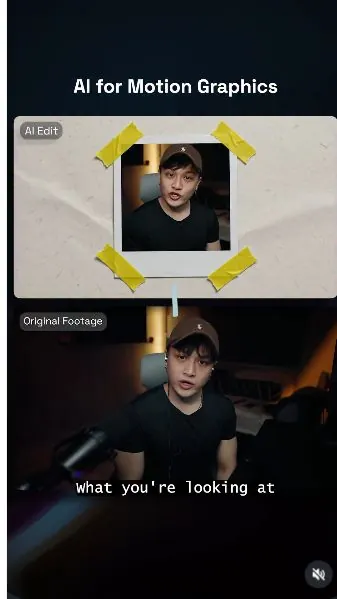
Add motion graphics to a talking-head video
Who this is for
Creators, marketers, founders, and small teams producing short AI-assisted videos from source media.
Step by step
Run the workflow
- 01
Prepare the source material
Use the source inputs to complete this stage and produce a result that can be checked before continuing.
- Click here to open pinterest.com (opens in a new tab)Direct link supplied in the source. Source page 3.
- Record a talking video of yourself.
- Go to Pinterest and find the reference style you wanted to duplicate.

Use this visual to confirm the expected setup or result. 
Use this visual to confirm the expected setup or result. Common failure modes- The generated scene changes the person, camera, room, product, or timing beyond the requested effect.
- Fast motion hides face, hand, clothing, text, or continuity errors that become visible when the clip is paused.
- 02
Drop the reference images into ChatGPT with my prompt (Next Page)
Use the source inputs to complete this stage and produce a result that can be checked before continuing.
Personal Creative Director

Check the prompt field, reference order, and visible settings. Common failure modes- The generated scene changes the person, camera, room, product, or timing beyond the requested effect.
- Fast motion hides face, hand, clothing, text, or continuity errors that become visible when the clip is paused.
- 03
Scene 1: "Insert Script"
Use the source inputs to complete this stage and produce a result that can be checked before continuing.
- Copy the prompt below and replace any project-specific subject, product, location, or format details.
- Attach the source assets in the same order described by the prompt, then run one controlled test.
Working assetScene 1: "Insert Script" prompt I uploaded 3 motion graphic-style references. Analyze all motion graphic references first, then create a detailed Gemini Video Prompt that translates the style into a standalone creative direction for the source video. Important output rule: Do not mention "reference image," "uploaded reference," "style reference," or "based on the references" in the final Gemini prompt. The final prompt must be written as if the style direction is already fully understood. Describe the visual language directly and specifically, without telling Gemini to look back at the references. Critical identity rule: The person in the final video must be the exact same person from the source video. Do not invent a new face. Do not replace the person with a generic stock face. Do not change ethnicity, age, facial structure, hairstyle, facial hair, expression style, or recognizable identity. Every photo cutout, floating head, bobblehead, full-body collage character, Polaroid frame, and typography composition must use the source video person's actual face and likeness. The face should remain recognizable in every shot, even when stylized with halftone, paper texture, or collage treatment. The final prompt should explicitly tell Gemini to extract the person's face and body from the source video and reuse that same identity throughout the whole motion graphic. STYLE REQUIREMENTS Animation - Agile stop-motion - 12 FPS - No motion blur - Snappy frame-by-frame movement - Intentional handmade jitter - Fast object swaps and paper repositioning Typography - Fast kinetic text pop-ups - Bold condensed fonts - Stamp texture treatment - Word-by-word impact timing - Oversized editorial headlines - Paper label captions - Black ink and electric yellow emphasis words Camera - Dynamic fast zooms - Punch-ins - Whip-pan transitions - Fast crash zooms - Snap pullbacks - Rotating collage board transitions - Close-up macro shots of paper texture, tape, stamps, and cutout edges Movement - Organic paper cutout motion - Visible drop-shadow shifts - Stop-motion layer sliding - Polaroid frames slapping onto screen - Torn paper wipes - Tape strips peeling and snapping down - Cutout heads bouncing, rotating, and scaling - Full-body paper character moving like a puppet Mood - Highly energetic - Bold - Tactile - Cinematic editorial style - Fast, playful, premium, and handmade Color Palette - Off-white - Charcoal black - Electric yellow accents - Occasional muted red or teal only if needed for contrast, but keep yellow as the main accent OUTPUT Create a scene-by-scene Gemini Video Prompt that follows the voiceover script above and recreates the analyzed motion graphic style as a standalone creative direction. The final prompt must include: - Strong identity preservation instructions - Visual direction for every shot - Camera movement - Typography animation - Object movement - Composition - Character treatment - When to show floating head cutouts - When to show full-body paper character - When to show Polaroid/photo-frame treatment - Transitions - Texture treatment - Timing and pacing The video should feel like a premium editorial motion graphic created by a top motion design studio. Again, do not reference the uploaded images in the final Gemini prompt. Extract their style, then write the final Gemini Video Prompt as a direct production brief. Reply in just a ready and copy paste prompt without any other comments.
Use this source result as the visual comparison point for the step. 
Use this source result as the visual comparison point for the step. Common failure modes- The generated scene changes the person, camera, room, product, or timing beyond the requested effect.
- Fast motion hides face, hand, clothing, text, or continuity errors that become visible when the clip is paused.
- 04
Assemble the video
Use the source inputs to complete this stage and produce a result that can be checked before continuing.
- Now Edit your video with your newly generated image.
- With your assets ready, it's time to edit your footages!

Check the prompt field, reference order, and visible settings. 
Check the prompt field, reference order, and visible settings. 
Check the prompt field, reference order, and visible settings. 
Check the prompt field, reference order, and visible settings. Common failure modes- The generated scene changes the person, camera, room, product, or timing beyond the requested effect.
- Fast motion hides face, hand, clothing, text, or continuity errors that become visible when the clip is paused.
Before you use it
Final checks
- Check the full result for changed people, products, text, timing, or layout.
- Confirm the tool, model, controls, and cost before generating.
- Keep private or unreleased material out of third-party tools.
Share your work
Made it? Show me.
Post your finished result on Instagram and tag @terencesia. I'll share a few standout results with the community.
Tag @terencesia on Instagram (opens in a new tab)Next step
Run one low-cost test, record the first visible failure, and revise only the instruction or source asset tied to that problem.
Back to the tutorial library