
 Watch the original videoInstagram (opens in a new tab)
What you'll make
A checked final video that follows the source workflow and is ready for export.
Animate a newspaper into a cinematic sequence
Who this is for
Creators, marketers, founders, and small teams producing short AI-assisted videos from source media.
Step by step
Run the workflow
- 01
Workflow behind how I made this exact video
Use the source inputs to complete this stage and produce a result that can be checked before continuing.
- Click here to open Google Flow (opens in a new tab)Official tool link added because the source does not include a working tool destination.
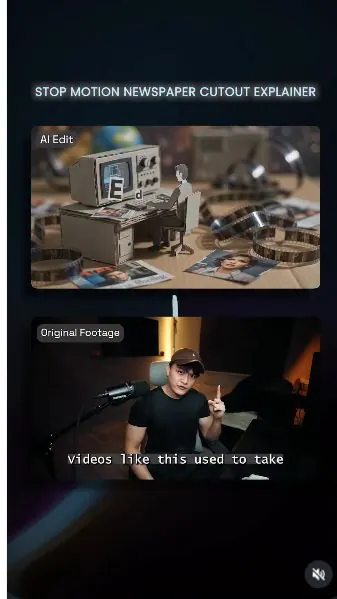
These are key frames from my reel. This source breaks down the full

Use this visual to confirm the expected setup or result. 
Use this visual to confirm the expected setup or result. 
Use this visual to confirm the expected setup or result. 
Use this visual to confirm the expected setup or result. 
Use this visual to confirm the expected setup or result. Common failure modes- The generated scene changes the person, camera, room, product, or timing beyond the requested effect.
- Fast motion hides face, hand, clothing, text, or continuity errors that become visible when the clip is paused.
- 02
Use the supplied prompts
Use the source inputs to complete this stage and produce a result that can be checked before continuing.
- Copy the prompt below and replace any project-specific subject, product, location, or format details.
- Attach the source assets in the same order described by the prompt, then run one controlled test.
Working assetUse the supplied prompts prompt Modify the provided prompts and for Phase 3. Phase 1: Use My Prompts Phase 1: Use My Prompts Generate a single continuous stop-motion video with dynamic motion. Do not cut, fade, morph, dissolve, interpolate, or reset the scene. Every newly revealed environment must already exist within a larger handcrafted paper world, maintaining perfect spatial continuity. Cinematic with bookeh. Extremely fast motion and choppy. Create everything as a physical paper cutout collage using layered textured paper, cardboard, magazine clippings, newspaper, and printed illustrations. Every element should have rough hand-cut edges, visible paper fibers, layered depth, and strong paper shadows. The overall look should feel like a handcrafted editorial documentary. Animate entirely in handcrafted stop-motion at approximately 12fps. Use choppy frame-by-frame movement with organic jitter, slight wobble, and imperfect timing. Avoid smooth CGI motion, motion blur, or digital interpolation. The camera continuously zooms backward at a steady pace, revealing increasingly larger nested scenes. Every reveal must physically connect to the previous scene. Never use transitions, morphing, or scene resets. Integrate animated paper typography into the environment instead of standard subtitles. Build the text from paper cutouts, magazine letters, or newspaper clippings. Animate with stop-motion using creative movements such as popping, unfolding, rotating, sliding, or assembling while matching the scene's energy. Each scene should visually represent the narration while preserving the same handcrafted collage style and continuous zoom-out. At [X]s to [X]s Supers: "..." Scene: [Describe the matching scene.] Priority: Continuous infinite zoom-out, handcrafted paper collage, authentic 12fps stop-motion, narration- matched scenes, creative kinetic paper typography, and absolutely no cuts, morphs, or scene resets.Common failure modes- The generated scene changes the person, camera, room, product, or timing beyond the requested effect.
- Fast motion hides face, hand, clothing, text, or continuity errors that become visible when the clip is paused.
- 03
Generate the video from the prompt
Use the source inputs to complete this stage and produce a result that can be checked before continuing.
- Now Generate the video from scratch without needing any asset.
- Input the edited prompt 1

Check the prompt field, reference order, and visible settings. 
Check the prompt field, reference order, and visible settings. Common failure modes- The generated scene changes the person, camera, room, product, or timing beyond the requested effect.
- Fast motion hides face, hand, clothing, text, or continuity errors that become visible when the clip is paused.
Before you use it
Final checks
- Check the full result for changed people, products, text, timing, or layout.
- Confirm the tool, model, controls, and cost before generating.
- Keep private or unreleased material out of third-party tools.
Share your work
Made it? Show me.
Post your finished result on Instagram and tag @terencesia. I'll share a few standout results with the community.
Tag @terencesia on Instagram (opens in a new tab)Next step
Run one low-cost test, record the first visible failure, and revise only the instruction or source asset tied to that problem.
Back to the tutorial library