
 Watch the original videoInstagram (opens in a new tab)
What you'll make
A character-swapped video with a voice you choose.
Use your own footage and a character reference to create a new version of yourself.
Who this is for
Creators with a recorded performance and a character idea.
Step by step
Run the workflow
- 01
Record yourself
Record the movements, expressions and speech you want to keep. Keep your face clearly visible and retain the original audio.

- 02
Create your character sheet
Open ChatGPT and use the sample prompt below. Replace the highlighted description, then save the generated image.

Example: the same character in three views. Working assetCharacter-sheet template
Sample template, not the original prompt used to create this image.
Character-sheet template Highlighted text in [brackets] = replace with your own.
Create a photorealistic character reference sheet of [describe your adult character: age, face, hairstyle, outfit and accessories]. Use three panels: a front-facing face close-up, a three-quarter face close-up, and a full-body front view with both feet visible. Show exactly the same person, facial features, hair, outfit and accessories in every panel. Use a neutral expression, a plain white background, soft even lighting, realistic skin texture and natural proportions. No text, labels, logos or watermarks. - 03
Upload to Seedance 2.5
- Click here to open Higgsfield (opens in a new tab)Sponsored Reel.
- In Higgsfield, select Seedance 2.5 → References. Upload your recorded video and character sheet.
- Choose the duration, aspect ratio and quality for your clip. This setup shows 30s, 16:9 and 720p.

1. Your video 2. Your character sheet 
Example settings. Unlimited mode is off in this screenshot. - 04
Paste the prompt and generate
- Use my exact prompt for this example, or adapt the template for your own character. Paste it into the prompt box and press Generate.
- In the template, @Video 1 is your uploaded footage, including its audio. @Image 1 is your character sheet. Match these tags to the labels in your editor.
Working assetMy exact prompt
Preserved exactly as used. The template below is for your own character and scene.
My exact prompt Replace only the person in the video with the young woman from the reference image, so she looks exactly like her photo in every frame: the same face shape, eyes, eyebrows, nose, lips, jawline, skin tone, hair and makeup, staying recognisably her even mid-expression, while talking, when turning her head, during fast movement and while eating; her face must be entirely her own and must not resemble the original man at all, with none of his face shape, jaw, cheeks, nose, eyes, brows, hairline, haircut, earrings or build; she is slender, with a slim face, narrow shoulders, slim arms and a feminine posture; she has clear, smooth skin with no moles, spots or marks anywhere on her face; match the original performance frame for frame, with the same body movements, head turns, eye movements, micro expressions, timing and lip movements, perfectly lip-synced to the original audio, including the fast movements and biting and chewing the food; keep the room, purple and warm lighting, wide-angle lens, camera position, framing and the food exactly as in the original; photorealistic phone footage with real skin texture, visible pores, natural skin shine, fine detail, realistic hair strands and natural light on her face, no smoothing, no beauty filter, no cinematic grading, no changes to anything other than the person.Adaptable video prompt
Adaptable video prompt Highlighted text in [brackets] = replace with your own.
Replace only the person in @Video 1 with [describe your adult character] from @Image 1. Match the reference character's face, hair, skin tone, body proportions, outfit and accessories consistently in every frame. Do not retain the original performer's facial features or build. Match the original performance frame for frame: body movements, head turns, eye movements, expressions, timing and lip movements. Keep the original audio from @Video 1 and match the lip movements to it, including [specific actions in your clip]. Keep [the setting, lighting, camera position, framing and props to preserve] exactly as in the original video. Preserve the original shots, cuts and camera movement. Photorealistic phone footage with natural skin texture, visible pores, realistic hair strands and consistent lighting. No beauty filter, smoothing or cinematic grading. Change nothing except the person. - 05
Change the voice
- Open the generated video’s three-dot menu → Change Voice.
- Preview the voices, select your favourite and press Change Voice.
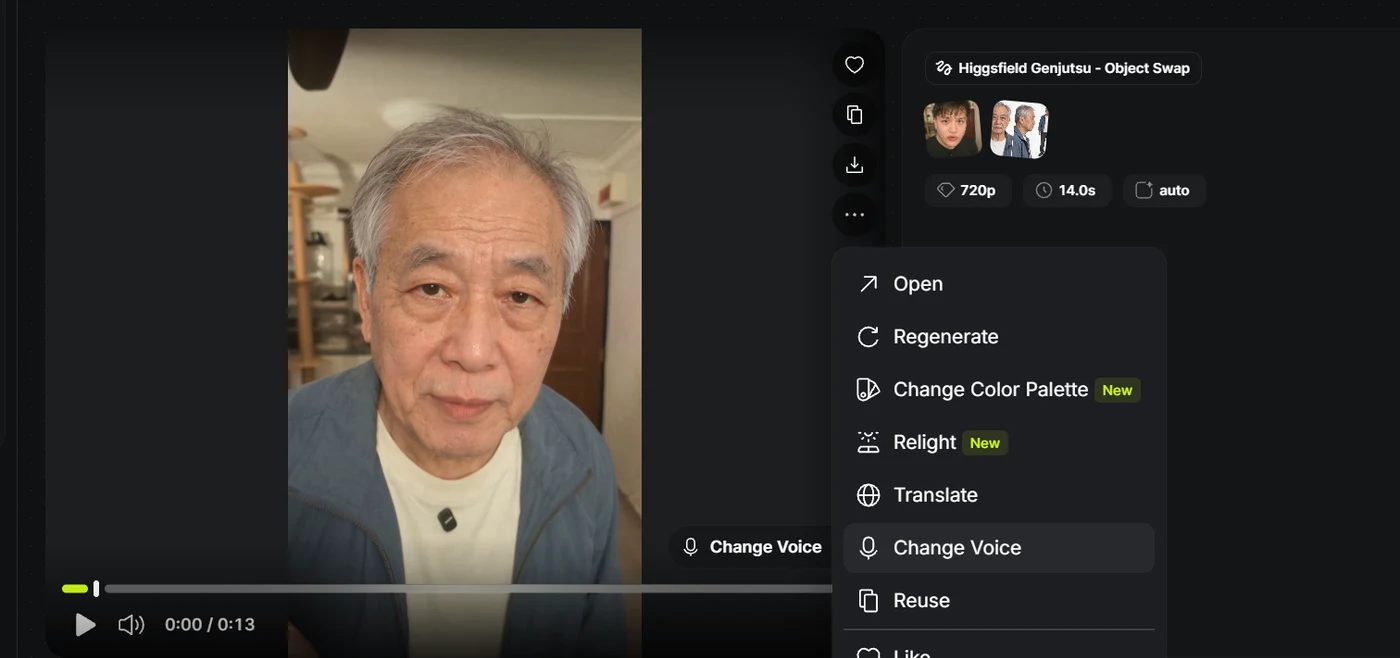
Result menu → Change Voice. Example from my earlier tutorial. 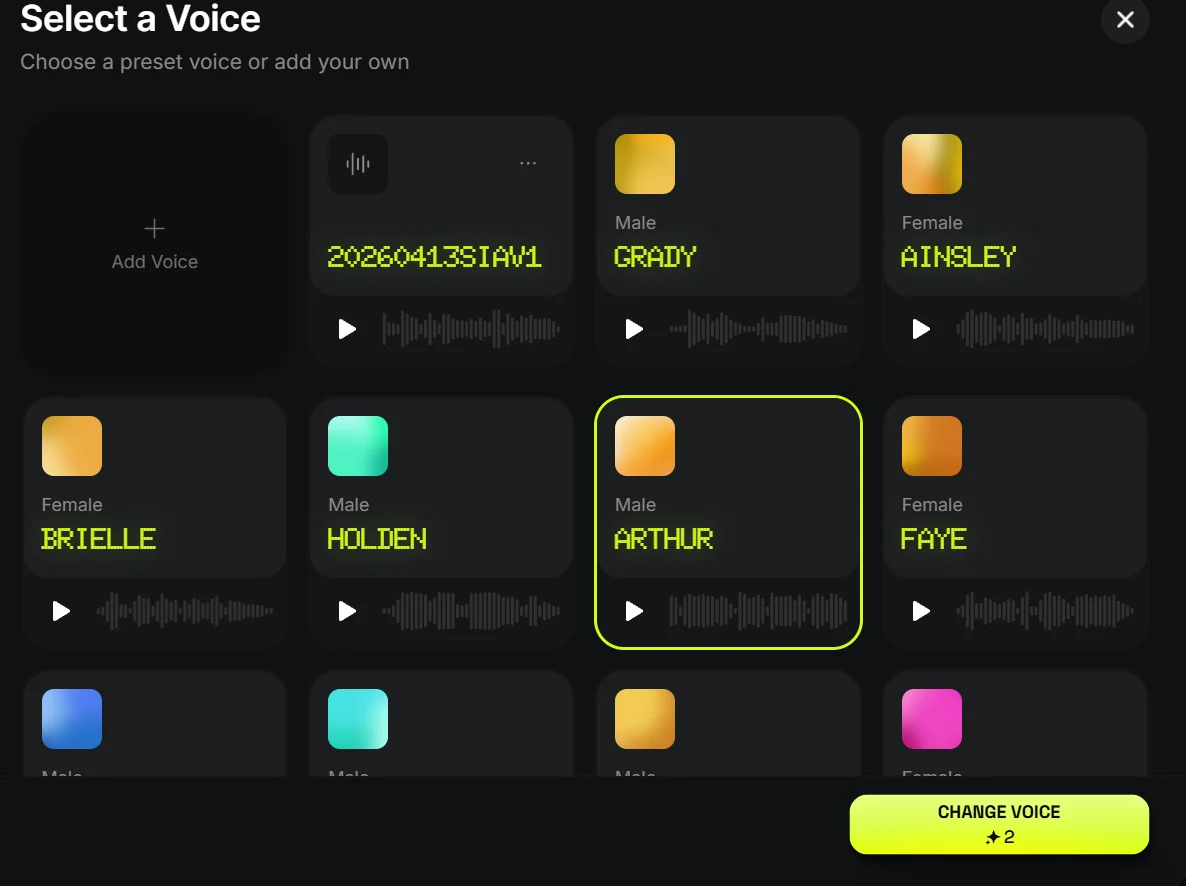
Preview → select → Change Voice. Arthur is only an example.