
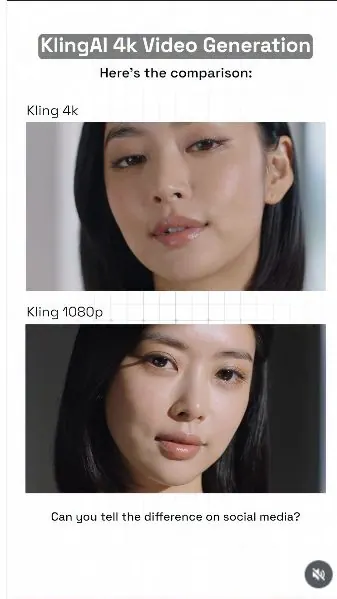
 Watch the original videoInstagram (opens in a new tab)
What you'll make
A checked final video that follows the source workflow and is ready for export.
Generate a 4K AI video with Kling
Who this is for
Creators, marketers, founders, and small teams producing short AI-assisted videos from source media.
Step by step
Run the workflow
- 01
The full workflow behind how I made this exact video
Use the source inputs to complete this stage and produce a result that can be checked before continuing.
- Click here to open Kling AI (opens in a new tab)Direct link supplied in the source. The Workflow Lab may earn a commission. Source page 10.
Follow the shown setup, keep the source order unchanged, and run one controlled test.

Use this visual to confirm the expected setup or result. 
Use this visual to confirm the expected setup or result. 
Use this visual to confirm the expected setup or result. 
Use this visual to confirm the expected setup or result. 
Use this visual to confirm the expected setup or result. Common failure modes- The generated scene changes the person, camera, room, product, or timing beyond the requested effect.
- Fast motion hides face, hand, clothing, text, or continuity errors that become visible when the clip is paused.
- 02
Generate a video clip 1
Use the source inputs to complete this stage and produce a result that can be checked before continuing.
- Copy the prompt below and replace any project-specific subject, product, location, or format details.
- Attach the source assets in the same order described by the prompt, then run one controlled test.
Working assetGenerate a video clip prompt 3-shot cinematic beauty video, total duration 9 seconds, ultra-realistic 4K, adult Korean female pop star inspired beauty campaign, luxury editorial aesthetic, high detail skin texture, visible pores, fine baby hairs, sharp eyelashes, realistic iris detail, glossy natural lips, silky black hair, subtle premium makeup, soft cinematic lighting, shallow depth of field, natural facial movement, no plastic skin, no over-smoothing, no distorted featuresShot 1, 0 to 3 seconds: close-up beauty shot of her face, soft window light, calm elegant expression, slight natural head movement, silky black hair framing her face, realistic skin texture, glossy lips, detailed eyelashes, premium luxury campaign lookShot 2, 3 to 6 seconds: extreme close-up of her cheek, lips, and skin texture, visible pores, fine baby hairs, subtle makeup blending, soft dewy finish, natural skin detail under gentle light, high realism skincare ad feelShot 3, 6 to 9 seconds: macro close-up of one eye, highly detailed iris, wet tear line, individual eyelashes, realistic reflections, subtle blink, tiny skin texture around the eye, cinematic beauty macro, ultra crisp detail
Use this source result as the visual comparison point for the step. 
Use this source result as the visual comparison point for the step. Common failure modes- The generated scene changes the person, camera, room, product, or timing beyond the requested effect.
- Fast motion hides face, hand, clothing, text, or continuity errors that become visible when the clip is paused.
- 03
Generate a video clip 2
Use the source inputs to complete this stage and produce a result that can be checked before continuing.
- Copy the prompt below and replace any project-specific subject, product, location, or format details.
- Attach the source assets in the same order described by the prompt, then run one controlled test.
Working assetGenerate a video clip prompt 2-scene macro insect video, total duration 6 seconds, ultra-realistic 4K, extreme detail test, cinematic nature documentary aesthetic, sharp micro texture, detailed exoskeleton, tiny hairs, segmented legs, reflective shell surface, realistic shadows, natural movement, shallow depth of field, no deformities, no extra legs, no melted anatomyScene 1, 0 to 3 seconds: macro shot of a jewel beetle crawling slowly across a dark green leaf, side angle, ultra-detailed exoskeleton texture, tiny hairs on legs, subtle natural light, realistic leaf veins, premium cinematic nature look, smooth controlled movement, crisp focus on the bodyScene 2, 3 to 6 seconds: extreme macro close-up of the beetle's head and front legs, highly detailed shell texture, antenna movement, reflective eyes, micro shadows, sharp leg articulation, realistic depth of field, luxury documentary finish, ultra crisp detail
Use this source result as the visual comparison point for the step. 
Use this source result as the visual comparison point for the step. Common failure modes- The generated scene changes the person, camera, room, product, or timing beyond the requested effect.
- Fast motion hides face, hand, clothing, text, or continuity errors that become visible when the clip is paused.
- 04
Generate a video clip 3
Use the source inputs to complete this stage and produce a result that can be checked before continuing.
- Copy the prompt below and replace any project-specific subject, product, location, or format details.
- Attach the source assets in the same order described by the prompt, then run one controlled test.
Working assetGenerate a video clip prompt 2-scene food macro video, total duration 6 seconds, ultra-realistic 4K, cinematic food detail test, extreme surface texture, realistic gloss, crumbs, moisture, steam, layered detail, shallow depth of field, premium food commercial aesthetic, natural motion, no fake texture, no plastic food, no broken physicsScene 1, 0 to 3 seconds: macro shot of a knife cutting through a crispy loaf of bread, detailed golden crust, fine crumbs breaking apart, soft interior texture visible, warm natural light, realistic motion, premium cinematic food commercial look, crisp tactile detailScene 2, 3 to 6 seconds: extreme close-up of the cut surface and crust, ultra-detailed crumb structure, tiny crumbs falling, subtle steam rising, realistic moisture in the bread interior, shallow depth of field, luxury food ad finish, ultra crisp macro realism
Use this source result as the visual comparison point for the step. 
Use this source result as the visual comparison point for the step. Common failure modes- The generated scene changes the person, camera, room, product, or timing beyond the requested effect.
- Fast motion hides face, hand, clothing, text, or continuity errors that become visible when the clip is paused.
- 05
Generate a video clip 4
Use the source inputs to complete this stage and produce a result that can be checked before continuing.
- Copy the prompt below and replace any project-specific subject, product, location, or format details.
- Attach the source assets in the same order described by the prompt, then run one controlled test.
Working assetGenerate a video clip prompt 2-scene cat fur close-up video, total duration 6 seconds, ultra-realistic 4K, cinematic animal texture test, extreme fur detail, individual hair strands, soft layered fur, realistic whiskers, subtle skin texture around nose and eyes, natural light response, shallow depth of field, gentle natural movement, premium nature documentary aesthetic, no fake fur, no clumped hair, no distorted anatomyScene 1, 0 to 3 seconds: close-up of a fluffy cat sitting by a window in soft sunlight, detailed fur around the face and neck, visible whiskers, calm expression, gentle breathing movement, warm natural light revealing soft layers of fur, crisp focus on the face, premium cinematic animal portrait lookScene 2, 3 to 6 seconds: extreme close-up of the cat's cheek fur, whiskers, nose, and one eye, ultra-detailed individual hair strands, subtle fur movement, realistic moisture on the nose, soft eye reflection, shallow depth of field, luxury documentary finish, ultra crisp macro realism
Use this source result as the visual comparison point for the step. 
Use this source result as the visual comparison point for the step. Common failure modes- The generated scene changes the person, camera, room, product, or timing beyond the requested effect.
- Fast motion hides face, hand, clothing, text, or continuity errors that become visible when the clip is paused.
- 06
Generate a video clip 5
Use the source inputs to complete this stage and produce a result that can be checked before continuing.
- Copy the prompt below and replace any project-specific subject, product, location, or format details.
- Attach the source assets in the same order described by the prompt, then run one controlled test.
Working assetGenerate a video clip prompt 2-scene wet surface realism video, total duration 6 seconds, ultra-realistic 4K, cinematic macro detail, wet skin and water droplet texture test, realistic surface tension, specular highlights, translucent droplets, natural reflections, soft controlled lighting, shallow depth of field, high detail moisture rendering, no fake water, no plastic skin, no broken physicsScene 1, 0 to 3 seconds: close-up of a woman's cheek and jawline with fine water droplets resting naturally on the skin, visible pores, soft dewy texture, gentle side light creating realistic highlights, subtle natural movement, premium skincare campaign look, crisp droplet edges, cinematic beauty realismScene 2, 3 to 6 seconds: extreme close-up of water slowly rolling down the skin, realistic droplet shape and surface tension, detailed reflections inside the droplet, sharp skin texture underneath, soft highlight rolloff, shallow depth of field, ultra crisp macro realism, luxury beauty ad finishNegative prompt: fake droplets, melted water, blurry texture, plastic skin, waxy face, low detail, unnatural reflections, flicker, oversharpening, broken physics, compression artifacts
Use this source result as the visual comparison point for the step. 
Use this source result as the visual comparison point for the step. Common failure modes- The generated scene changes the person, camera, room, product, or timing beyond the requested effect.
- Fast motion hides face, hand, clothing, text, or continuity errors that become visible when the clip is paused.
- 07
Generate a video clip 6
Use the source inputs to complete this stage and produce a result that can be checked before continuing.
- Copy the prompt below and replace any project-specific subject, product, location, or format details.
- Attach the source assets in the same order described by the prompt, then run one controlled test.
Working assetGenerate a video clip prompt 2-second macro eye shot, ultra-realistic 4K, extreme close-up of one human eye, highly detailed iris texture, wet tear line, individual eyelashes, subtle skin texture around the eyelid, realistic reflections and catchlights, soft moving light across the eye, tiny natural eye movement, cinematic beauty macro, shallow depth of field, ultra crisp detail, no plastic skin, no distorted eye, no fake reflectionsNegative prompt: blurry iris, distorted pupil, extra eyelashes, fake reflections, waxy skin, low detail, uncanny eye, broken eyelid, flicker, oversharpening, compression artifacts
Use this source result as the visual comparison point for the step. 
Use this source result as the visual comparison point for the step. Common failure modes- The generated scene changes the person, camera, room, product, or timing beyond the requested effect.
- Fast motion hides face, hand, clothing, text, or continuity errors that become visible when the clip is paused.
Before you use it
Final checks
- Check the full result for changed people, products, text, timing, or layout.
- Confirm the tool, model, controls, and cost before generating.
- Keep private or unreleased material out of third-party tools.
Share your work
Made it? Show me.
Post your finished result on Instagram and tag @terencesia. I'll share a few standout results with the community.
Tag @terencesia on Instagram (opens in a new tab)Next step
Run one low-cost test, record the first visible failure, and revise only the instruction or source asset tied to that problem.
Back to the tutorial library