
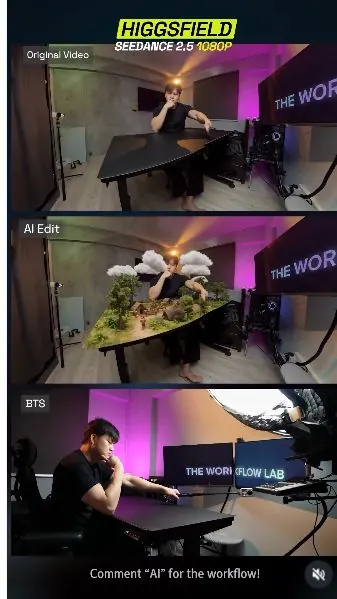
 Watch the original videoInstagram (opens in a new tab)
What you'll make
A reviewed 30-second video with a persistent miniature world composited onto the tabletop.
Add a miniature ancient world to a real tabletop performance without replacing the original person, room, camera move, or timing.
Who this is for
Creators and small teams testing reference-led AI video effects from footage they filmed and have permission to use.
Step by step
Run the workflow
- 01
Plan the tabletop interactions
Give every recorded gesture one effect that can be placed on the existing table.
- Choose one surface with clear edges. The miniature world must remain inside that boundary.
- List each performance moment in order, such as a finger flick, hand swipe, sneeze, pinch, and day-to-night control.
- Assign one visible reaction to each gesture, then rehearse the timing before recording.
- Keep the scene simple. The source camera, person, room, table, and motion should remain unchanged in the final result.

Use this visual to confirm the expected setup or result. Common failure modes- Too many actions overlap, so the model cannot map one effect to one gesture.
- The surface edge is unclear, allowing the generated world to spill into the room.
- 02
Record the source performance
Create the immutable live-action plate that the generated effects must follow.
- Record one continuous 20-to-30-second take with the whole table, person, and hand path visible.
- Use steady light and avoid private screens, documents, bystanders, or unapproved branding in the room.
- Perform every planned gesture at its rehearsed time without adding camera cuts.
- Keep the original file unchanged and note the timestamp of each usable action.

Use this source result as the visual comparison point for the step. 
Use this source result as the visual comparison point for the step. Common failure modes- A hand leaves the frame or misses the intended contact point.
- Camera movement, lighting changes, reflections, or background details make the source hard or unsafe to reuse.
- 03
Open Seedance 2.5 and upload the source
Load the approved clip into the correct Higgsfield video workflow.
- Click here to open Seedance 2.5 in Higgsfield (opens in a new tab)Official tool link. The original PDF names Higgsfield but does not include a Higgsfield URL.
- Open Higgsfield, choose Video from the top navigation, and select Seedance 2.5.
- Click Upload Media and add the approved source video to the media library.
- Select the uploaded clip as the reference used by the prompt.
- Check the current model label, account access, and displayed credit cost before continuing.

- Open Video

Use this visual to confirm the expected setup or result. 
Check the selected files and their order before continuing. 
- Upload Media
Common failure modes- The wrong source is selected, so the prompt refers to timing and gestures that do not exist.
- The model or interface has changed, but generation begins before the available settings and credit cost are checked.
- 04
Adapt and paste the miniature-world prompt
Tell the model what may change while protecting the original footage.
- Click here to open SIA's miniature-world prompt (opens in a new tab)Direct prompt-document link supplied on page 6 of the original PDF.
- Open SIA's supplied prompt and compare its timeline with your recorded gesture timestamps.
- Replace any action, time, surface, setting, or sound instruction that does not match your source.
- Keep the preservation rules: the source camera, framing, lens, person, room, table, timing, and motion do not change.
- Reference the uploaded source video in the prompt, then read the complete prompt once before pasting it into Higgsfield.
Working assetMiniature-world video-to-video prompt VIDEO-TO-VIDEO EDIT. Use the uploaded original video as the IMMUTABLE SOURCE PLATE. This is NOT a remake. This is NOT a reimagining. This is NOT a regenerated scene. Do NOT recreate the original video. KEEP THE ORIGINAL VIDEO FOOTAGE ITSELF. The only change allowed is this: add a tiny ultra-realistic ancient civilization ON THE EXISTING TABLETOP ONLY. Everything else must remain the same. ABSOLUTE PRIORITY: The original camera movement, background, room, man, body motion, hand motion, framing, timing and lens perspective must stay the same. DO NOT CHANGE: camera movement camera angle camera distance framing lens distortion fisheye / wide-angle look room wall desk setup furniture lighting on the real room the man's face the man's body the man's clothing the man's gesture timing his original hand trajectory the real table position and shape Do not redraw them. Do not replace them. Do not stylize them. Do not make a similar version. Use the source video. This should feel like high-end VFX composited onto the original untouched footage. TABLETOP RULE: The civilization appears ONLY on the tabletop surface. Nothing from the civilization may appear: outside the table on the wall in the room behind the man on the floor floating around the room The tabletop must still clearly look like the same original table from the source footage. Do NOT replace the table with a fantasy island. Do NOT enlarge the table. Do NOT transform the whole foreground into a world. The world is only a miniature VFX layer sitting on top of the existing table. VISUAL STYLE: Ultra-photorealistic LIVE-ACTION look. The miniature humans are REAL HUMANS digitally shrunk tiny. They must not look like toys, dolls, clay, figurines or cartoons. They should have: real skin real hair real fabric clothing realistic facial expressions realistic body movement natural human behavior Ancient setting: tiny wooden houses, huts, bamboo structures, little paths, campfires, jungle growth, trees, farms, tiny villagers, animals, small water area, and a few floating clouds above the tabletop civilization. The floating clouds exist ONLY above the tabletop world, not in the room. The giant man is still just the normal real man from the original video. He only appears god-like relative to the tiny civilization. IMPORTANT INTERACTION RULE: Never change the man's motion to suit the effects. Instead, place miniature objects so they naturally line up with his EXISTING recorded gestures. The civilization adapts to the source video. The source video never adapts to the civilization. TIMELINE 0-3.5s Keep the original shot unchanged. The tabletop contains a tiny active ancient jungle civilization. Tiny real humans walk around, work, farm, trade, carry baskets, build and interact. Some notice the giant man above them. Some point upward. Some become nervous. A few bow or pray. Everything outside the tabletop remains identical to the source footage. Around 4s Use the man's exact original finger flick. Do not change his finger. Place a small tall tree precisely at the contact point of the original finger path. His real recorded fingertip flicks the tree away. The tree flies across the tabletop world. Leaves scatter. Tiny villagers panic and run. Some hide behind huts. Some grab family members. Some kneel and pray. Only the tabletop world reacts. The room remains unchanged. Around 5.5s Use the next exact original finger action. Place another tree where his original finger motion hits it. The tree cracks and falls into part of the settlement. Tiny villagers run away in fear. Dust spreads across the tabletop. Keep his body and hand exactly the same as the source footage. Around 7s Use the man's exact original hand swipe. Do not create a new swipe. At this moment, several low floating clouds drift above the miniature tabletop civilization and block his view of the tiny world. His existing swipe clears those floating clouds away. The clouds break apart and sweep sideways off the tabletop area, as if he is brushing away something obstructing his vision. At the same time, some loose leaves, branches and lightweight tabletop debris can also be pushed aside by the airflow of the swipe. The swipe should feel like he is clearing the floating cloud cover because it is blocking his vision of the village below. Tiny villagers react to the sudden gust. Trees bend. Loose objects slide. People duck and hold onto structures. The cloud exists only over the tabletop world. Do not place clouds in the room. 8-10.4s Continue following the original camera motion exactly. The tabletop world remains persistent. Previously damaged trees stay damaged. Villagers recover and help each other. Dust settles. No reset. Around 10-11s Use the man's exact sneeze motion as recorded. Do not change his face, posture or hands. His sneeze sends a powerful pressure wave across the tiny tabletop world only. The small water area on the tabletop is blasted backward, then rushes back forward as a miniature tide. Tiny villagers near the water flee inland. Small boats shift. Water splashes through lower village paths. Vegetation bends. Structures shake. The water stays confined to the tabletop world. It must not affect the room. Around 13-16s Use the exact original reaching, pinching, lifting and lowering motion already present in the source video. Do not alter the hand animation. Place one tiny real human at the exact pinch location. His original thumb and finger pick up the tiny human carefully. The miniature person should look like a real human actor at tiny scale. They react naturally, frightened but unharmed. Follow the original hand path exactly. When the hand lowers, he places the tiny person somewhere safe on another part of the same tabletop world. Nearby villagers react with gratitude and amazement. Around 18s No tiger. Replace the previous tiger event completely. At this moment, a final small cluster of floating clouds drifts over part of the tabletop village and partially blocks visibility. Use the man's exact original quick finger gesture to flick or push this remaining cloud cluster away. The cloud drifts aside and clears the village beneath. Sunlight over the tabletop world becomes visible again. Tiny villagers below react to the sudden clearing sky. This is a vision-clearing action, not an animal interaction. Around 21s Use the man's exact raised finger movement. Add only a small subtle translucent interface near his fingertip. Do not change his hand. Do not change the room. Simple UI: DAY | slider | NIGHT His existing finger movement drags the slider from day toward night. IMPORTANT: Only the tabletop civilization changes from day to night. The full-size real room does NOT change. The man's lighting does NOT change. The walls do NOT change. The background does NOT become dark. Only within the tabletop world: daylight fades tiny village torches light up campfires glow brighter windows illuminate moonlit nighttime falls over the tabletop civilization fireflies appear The effect must stop exactly at the table boundary. FINAL SECTION Keep following the original camera movement exactly. Do not create a new cinematic ending. Do not fly into the tabletop. Do not invent a POV through the jungle. If the original camera lowers or moves, preserve that exact movement. Only allow the miniature world to be seen from whatever angle the original camera already provides. The tiny villagers continue living on the table. Some emerge from hiding. Some inspect damage. Some gather around the rescued villager. The cloud cover is now cleared. The tiny world remains alive. SOURCE PRESERVATION PRIORITY ORDER: 1. exact original camera motion 2. exact original framing 3. exact original lens perspective 4. exact original man 5. exact original body and hand motion 6. exact original room and background 7. exact original table shape and placement 8. added tabletop civilization VFX If any VFX instruction conflicts with items 1-7, ignore the VFX instruction and preserve the source video instead. AUDIO: Preserve the original speech and timing. Do not change the original dialogue timing. Add only fitting environmental sound: tiny villagers shouting, footsteps, wood cracking, trees falling, wind gusts, leaves, soft animal ambience, water movement, campfires, night insects, subtle cloud-whoosh when he clears the floating clouds. No cartoon sound design. No exaggerated fantasy voice. Any intelligible generated speech must be ENGLISH ONLY. NEGATIVE INSTRUCTIONS: No cuts. No hidden cuts. No scene resets. No camera changes. No reframing. No zooming. No new angles. No camera orbit. No stabilized replacement footage. No changing the man's face. No changing the man's body. No changing the room. No changing the real-world lighting. No giant fantasy island. No tabletop world expanding outside the table. No toy people. No cartoon people. No clay people. No plastic look. No fake diorama look. No clouds floating in the room. No tiger. FINAL INTENT: The result must look like the exact same original live-action video, untouched, except that a tiny photorealistic ancient civilization exists only on the tabletop, with a few floating clouds over that miniature world, and the man's original gestures naturally affect only that tabletop civilization. Add subtle game sound effects whenever he performs an action. @[Video 1](video_1)Common failure modes- The original timestamps are pasted unchanged even though the new performance happens at different moments.
- The prompt describes an effect outside the table, causing the room or person to be regenerated.
- The uploaded video is not referenced correctly, so the model treats the prompt as a new scene instead of an edit.
- 05
Set the output and review the generation
Generate one controlled test and reject any result that changes the source plate.
- Set the duration to match the source, choose the destination aspect ratio, and select the smallest useful resolution for the first test.
- Check the displayed bitrate, audio option, and credit cost, then generate one result.
- Watch the full clip once for the story, then compare it with the original frame by frame.
- Approve only a result that preserves the person, room, camera, table, gesture timing, and tabletop boundary.

Use this source result as the visual comparison point for the step. 
Use this source result as the visual comparison point for the step. Common failure modes- The miniature scene spills beyond the table or replaces the table with a fantasy landscape.
- The face, hands, room, lens perspective, lighting, or camera motion drifts from the source.
- The output looks convincing but introduces unsafe audio, implausible interactions, or unapproved people and assets.
Before you use it
Final checks
- Compare the result with the source frame by frame. AI video can change faces, hands, rooms, motion, and timing.
- Use only footage, people, voices, locations, and sounds you have permission to process and publish.
- Never upload confidential or unreleased material without approval. Check the current tool terms and data settings first.
Share your work
Built the miniature world? Show me.
Post your finished video on Instagram and tag @terencesia. I'll share a few standout results with the community.
Tag @terencesia on Instagram (opens in a new tab)Next step
Run one low-cost test with the approved source. Compare it with the original, then adjust only the prompt lines tied to a visible failure.
Back to the tutorial library