
 Watch the original videoInstagram (opens in a new tab)
What you'll make
A checked set of generated visuals matched to the source assets and intended format.
Use ChatGPT to plan a visual glow-up
Who this is for
Creators, marketers, founders, and small teams producing visual work from their own source assets.
Step by step
Run the workflow
- 01
Workflow behind how I made this exact video
Use the source inputs to complete this stage and produce a result that can be checked before continuing.
- Click here to open ChatGPT (opens in a new tab)Official tool link added because the source does not include a working tool destination.
These are key frames from my reel. This source breaks down the full

Use this visual to confirm the expected setup or result. 
Use this visual to confirm the expected setup or result. 
Use this visual to confirm the expected setup or result. 
Use this visual to confirm the expected setup or result. 
Use this visual to confirm the expected setup or result. Common failure modes- The model changes the subject, framing, text, product, or background instead of editing only the requested element.
- The result looks polished at first glance but contains broken hands, unreadable text, warped objects, or inconsistent lighting.
- 02
Prepare the source material
Use the source inputs to complete this stage and produce a result that can be checked before continuing.
Capture selfie of yourself

Use this visual to confirm the expected setup or result. Common failure modes- The model changes the subject, framing, text, product, or background instead of editing only the requested element.
- The result looks polished at first glance but contains broken hands, unreadable text, warped objects, or inconsistent lighting.
- 03
Format as a 4:5 portrait report image 1
Use the source inputs to complete this stage and produce a result that can be checked before continuing.
- Color + wardrobe palette
- Analyze the uploaded image and create a visual style report for color and wardrobe palette.
- Use a clean pastel editorial design with a soft luxury magazine look. Use light beige, soft grey, sage, powder blue, and blush tones. Keep the layout minimal, elegant, polished, and easy to read. Format as a 4:5 portrait report image.
- Keep the same design theme that can match a full series of style reports.
- Include: 1. Best color season 2. Skin undertone 3. Contrast level 4. Best neutral colors 5. Best accent colors 6. Colors to avoid 7. Best clothing colors 8. Simple outfit color combinations
- Keep the advice short, practical, and visually clear.
- Do not change the person's face or identity. Use the uploaded image only for analysis reference.
Common failure modes- The model changes the subject, framing, text, product, or background instead of editing only the requested element.
- The result looks polished at first glance but contains broken hands, unreadable text, warped objects, or inconsistent lighting.
- 04
Analyze the uploaded image and create a visual style report for hairstyle and hair
Use the source inputs to complete this stage and produce a result that can be checked before continuing.
- Hairstyle + hair color
- Use the same clean pastel editorial design with a soft luxury magazine look. Use light beige, soft grey, sage, powder blue, and blush tones. Keep the layout minimal, elegant, polished, and easy to read. Format as a 4:5 portrait report image.
- Keep the same design theme that can match a full series of style reports.
- Include: 1. Face shape 2. Hairline observation 3. Current hairstyle assessment 4. Best haircut direction 5. Best fringe or no-fringe direction 6. Best hair volume and length direction 7. Best styling finish 8. Best hair color direction 9. Hair colors to avoid
- Keep the advice short, practical, and visually clear.
- Do not change the person's face or identity. Use the uploaded image only for analysis reference.
Common failure modes- The model changes the subject, framing, text, product, or background instead of editing only the requested element.
- The result looks polished at first glance but contains broken hands, unreadable text, warped objects, or inconsistent lighting.
- 05
Analyze the uploaded image and create a visual style report for face shape and
Use the source inputs to complete this stage and produce a result that can be checked before continuing.
- Face shape + eyewear
- Use the same clean pastel editorial design with a soft luxury magazine look. Use light beige, soft grey, sage, powder blue, and blush tones. Keep the layout minimal, elegant, polished, and easy to read. Format as a 4:5 portrait report image.
- Keep the same design theme that can match a full series of style reports.
- Include: 1. Face shape 2. Facial balance 3. Best glasses shapes 4. Glasses shapes to avoid 5. Best frame thickness 6. Best frame colors 7. Best sunglasses direction 8. Overall eyewear style direction
- Keep the advice short, practical, and visually clear.
- Do not change the person's face or identity. Use the uploaded image only for analysis reference.
Common failure modes- The model changes the subject, framing, text, product, or background instead of editing only the requested element.
- The result looks polished at first glance but contains broken hands, unreadable text, warped objects, or inconsistent lighting.
- 06
Format as a 4:5 portrait report image 2
Use the source inputs to complete this stage and produce a result that can be checked before continuing.
- Grooming + skin + facial hair
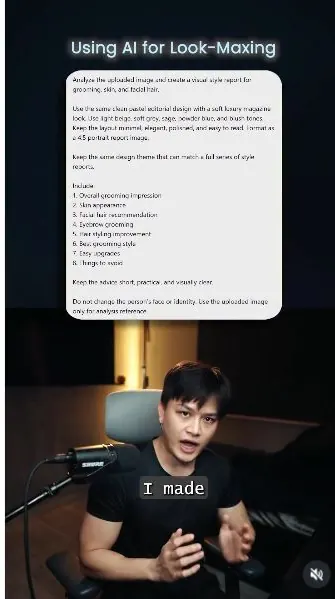
- Analyze the uploaded image and create a visual style report for grooming, skin, and facial hair.
- Use the same clean pastel editorial design with a soft luxury magazine look. Use light beige, soft grey, sage, powder blue, and blush tones. Keep the layout minimal, elegant, polished, and easy to read. Format as a 4:5 portrait report image.
- Keep the same design theme that can match a full series of style reports.
- Include: 1. Overall grooming impression 2. Skin appearance 3. Facial hair recommendation 4. Eyebrow grooming 5. Hair styling improvement 6. Best grooming style 7. Easy upgrades 8. Things to avoid
- Keep the advice short, practical, and visually clear.
- Do not change the person's face or identity. Use the uploaded image only for analysis reference.
Common failure modes- The model changes the subject, framing, text, product, or background instead of editing only the requested element.
- The result looks polished at first glance but contains broken hands, unreadable text, warped objects, or inconsistent lighting.
- 07
Format as a 4:5 portrait report image 3
Use the source inputs to complete this stage and produce a result that can be checked before continuing.
- Full glow-up + shopping list
- Analyze the uploaded image and create a visual style report for a full glow-up and shopping list.
- Use the same clean pastel editorial design with a soft luxury magazine look. Use light beige, soft grey, sage, powder blue, and blush tones. Keep the layout minimal, elegant, polished, and easy to read. Format as a 4:5 portrait report image.
- Keep the same design theme that can match a full series of style reports.
- Include: 1. Overall style impression 2. Strongest features 3. Biggest improvements 4. Best style direction 5. Best color direction 6. Best grooming direction 7. Best hairstyle direction 8. Best eyewear direction 9. Top 5 items to buy 10. Items to avoid 11. Simple outfit formula 12. Quick upgrade plan
- Keep the advice short, practical, and visually clear.
- Do not change the person's face or identity. Use the uploaded image only for analysis reference.
Common failure modes- The model changes the subject, framing, text, product, or background instead of editing only the requested element.
- The result looks polished at first glance but contains broken hands, unreadable text, warped objects, or inconsistent lighting.
- 08
Upload your image into ChatGPT and paste in the prompts
Use the source inputs to complete this stage and produce a result that can be checked before continuing.
Repeat this process with all the prompts!

Check the selected files and their order before continuing. Common failure modes- The model changes the subject, framing, text, product, or background instead of editing only the requested element.
- The result looks polished at first glance but contains broken hands, unreadable text, warped objects, or inconsistent lighting.
Before you use it
Final checks
- Check the full result for changed people, products, text, timing, or layout.
- Confirm the tool, model, controls, and cost before generating.
- Keep private or unreleased material out of third-party tools.
Share your work
Made it? Show me.
Post your finished result on Instagram and tag @terencesia. I'll share a few standout results with the community.
Tag @terencesia on Instagram (opens in a new tab)Next step
Run one low-cost test, record the first visible failure, and revise only the instruction or source asset tied to that problem.
Back to the tutorial library